No. Eighty per cent is not a failure point, and Apple has never published one. It is the capacity Apple designs an iPhone battery to still hold after a stated number of charge cycles. Your phone shows it to you as Maximum Capacity in Settings. What decides a replacement is how the phone behaves, not the number on that screen.
That answer frustrates people, because a percentage looks like a score. It isn’t one. Two iPhones can sit on the same figure and behave nothing alike. One gets through a full day; the other dies at 40 per cent on a cold morning. Here’s what the number actually is, what your phone is really telling you, and what to look at instead.
80 per cent is a design specification, not a pass mark
Apple publishes the figure on its Australian support page for iPhone 11 and later, and the wording is worth reading closely:
“Batteries of iPhone 14 models and earlier are designed to retain 80 per cent of their original capacity at 500 complete charge cycles under ideal conditions.”
“Batteries of iPhone 15 models and later are designed to retain 80 per cent of their original capacity at 1,000 complete charge cycles under ideal conditions.”
Take those sentences for exactly what they say. They describe what the battery is built to do across a set number of cycles. Neither one says a battery below 80 per cent has failed. Neither one says you should replace a battery when it reaches 80.
Notice the last three words, too. “Under ideal conditions” is Apple’s own hedge, and it is doing real work — your phone has not lived under ideal conditions.
Then notice the cycle counts. The same 80 per cent is pinned to 500 cycles on one generation of hardware and 1,000 on the next. A figure that doubles when the engineering changes is a specification about the product. It was never a test that sorts a healthy battery from a faulty one.
What your iPhone actually shows you
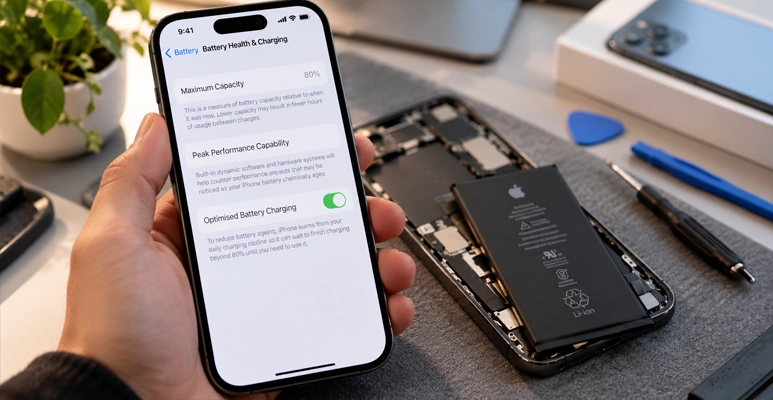
Open Settings, tap Battery, then tap the battery health entry. On iPhone 15 and later it is called Battery Health. On iPhone 11 to 14 it is called Battery Health & Charging. Both were checked on iOS 27 in September 2026.
The top line is Maximum Capacity. Apple defines it plainly: “Maximum battery capacity measures the device battery capacity relative to when it was new.”
That is all it is — a comparison against the day the phone left the factory. It is not a countdown, it is not a warranty status, and it does not predict how many months you have left.
On iPhone 15 and later, the same screen also shows a cycle count. That is the more useful half, because it is the figure Apple’s design specification is actually written against. A phone at 84 per cent with 300 cycles and a phone at 84 per cent with 900 cycles are two very different stories.
The one line in iOS that does recommend a replacement
Under Maximum Capacity sits Peak Performance Capability, and this is where iOS comes closest to giving you a verdict. It has a handful of states, in Apple’s own words.
When everything is fine, it reads: “Your battery is currently supporting normal peak performance.”
If the phone has shut down on its own because the battery couldn’t deliver enough power at once, it reads: “This iPhone has experienced an unexpected shutdown because the battery was unable to deliver the necessary peak power. Performance management has been applied to help prevent this from happening again.”
And when Apple does recommend service, it says so directly: “Your battery’s health is significantly degraded. An Apple Authorised Service Provider can replace the battery to restore full performance and capacity.”
That last message is the closest thing to an instruction your phone will ever give you about the battery. Apple’s page does not tie it to a percentage. It is the phone reporting on behaviour — shutdowns and power delivery — rather than reading a number off a chart.
Two phones on the same percentage can be in completely different shape
Maximum Capacity compresses years of history into one figure, and a lot gets lost on the way.
Cycle count is part of it. So is age. So is heat. Apple says iPhone works best between 0 and 35 degrees Celsius, and warns that going above 35 “can permanently damage battery capacity”. A phone that has spent two Melbourne summers on a car dashboard has a different battery to one that hasn’t. Both screens can still read 83 per cent.
Then there is how hard you drive it. Someone navigating and streaming all day puts a battery through more in a week than a light user does in a month. If you want to slow the slope down, there’s a separate guide to extending your iPhone battery life that covers the day-to-day settings.
If your iPhone stops charging at 80 per cent, that is a different 80 entirely
This one causes a lot of confusion, and it is worth separating cleanly. A phone that parks at 80 per cent while charging is not showing you a health reading. Apple’s Australian charging page gives three reasons it happens.
The first is Optimised Battery Charging: “Your iPhone uses on-device machine learning to understand your daily charging routine so that it can wait until you need to use your iPhone to finish charging past 80 per cent.”
The second applies to iPhone 15 and later, where “you may have a charge limit, which stops your iPhone from charging past a set limit.”
The third is heat. In Apple’s words, “if the battery gets too warm, software might limit charging above 80 per cent.”
None of those three says anything about the condition of your battery. If your phone sits at 80 overnight, check Settings before you assume the worst.
Not sure which 80 per cent you’re looking at?
Bring the phone into either store and we’ll open the battery screen with you and read it out.
The symptoms that actually decide it
Forget the percentage for a moment and look at the phone. These are the things worth acting on:
- It no longer gets through a day it used to get through comfortably.
- It shuts down on its own, or drops from a healthy-looking percentage straight to nothing.
- Peak Performance Capability says performance management has been applied.
- You are charging it far more often than you used to. Apple puts it simply: “If you need to charge your battery more and more frequently, it might be time to service it.”
- It runs hot in ordinary use, or the screen or back panel is starting to lift away from the frame. Stop using it and bring it in.
Symptoms point; they don’t prove. A phone that dies early can have a tired battery, a setting that changed after an update, or an app misbehaving. There’s a broader rundown of common iPhone problems worth a look first. But if two or three of the points above are true at once, the battery has earned a proper check.
What happens when we replace an iPhone battery
We check Maximum Capacity and the Peak Performance Capability message with you first, so you can see what we’re seeing. Then we open the phone, take the old battery out and fit the replacement. We put it back together and test it before it goes back in your hand. We fit top-quality replacement batteries, and our repairs carry a warranty — ask us in store for the terms that apply to your model.
Most repairs are done while you wait. Walk in at either store; you don’t need to book.
Where to find us
You’ll find us at Shop 3048C, Level 3, Westfield Southland, 1239 Nepean Hwy, Cheltenham VIC 3192, on (03) 8351 5319. Our other store is at Shop T45A, Brimbank Shopping Centre, 72 Neale Road, Deer Park VIC 3023, on (03) 9969 2490.
Eighty per cent is a design figure Apple attaches to a charge-cycle count, and it was never meant to be read as a pass mark. Check Maximum Capacity by all means. Then look at what the phone is actually doing: how far it gets through the day, whether it shuts down, and what Peak Performance Capability says. If those answers are fine, the number alone isn’t a reason to do anything. If they’re not, the battery is worth a look, and that is a quick thing for us at Jazzy Mobiles to check.
Frequently asked questions
What’s a good battery health for my iPhone?
There isn’t a published number, because Apple has never set one. Maximum Capacity tells you how much charge the battery holds compared to new, and that is all it tells you. A phone at 91 per cent that shuts down unexpectedly is in worse shape than one at 79 per cent that runs all day.
Is 85% battery health good after 2 years?
Apple doesn’t publish an expected percentage at a given age, so there is nothing official to measure it against. Cycles are the better yardstick. On iPhone 15 and later you can read the cycle count on the same screen and compare it to the 1,000-cycle design figure.
Is 70% iPhone battery health good?
It means the battery holds roughly 70 per cent of the charge it held when new. A day that used to end at 30 per cent will now end closer to flat. Apple publishes no failure threshold, so this is a judgement call. If the phone still does what you need between charges, there is no rule saying you must act.
Why doesn’t my iPhone show a cycle count?
Because that figure is shown on iPhone 15 and later. On iPhone 11 to 14 the screen shows Maximum Capacity and Peak Performance Capability, but no cycle count.
Will a new battery make my old iPhone faster again?
Only where performance management was slowing it down in the first place. If Peak Performance Capability says performance management has been applied, a healthy battery removes the reason for it. If that message isn’t there, the battery isn’t what’s holding the phone back.
Bring your iPhone in and we’ll check the battery with you
We’ll read the battery health screen together, tell you what it means, and talk through your options.