QUICK ANSWER
A laptop that won’t turn on is usually the charger, the battery, or a loose connection, not a dead laptop. Try a different power outlet, then hold the power button for 20 seconds to force a reset. If it still stays off, professional laptop repair can confirm whether the fault is the battery, the charging port, or the motherboard.
In this article
- What to check first when your laptop won’t turn on
- Common signs of laptop power problems
- Why you shouldn’t ignore laptop power issues
- What professional laptop repair involves
- Battery issue or motherboard issue?
- DIY fixes vs professional laptop repair
- Frequently asked questions
You press the power button. Nothing happens. No lights, no fan, no hum, just silence. It’s a horrible feeling, especially if there’s schoolwork, photos or important files sitting on that laptop.
The good news is that a laptop that won’t turn on is rarely beyond saving. Most of the time, the cause is something simple like a faulty charger or a flat battery, not a dead machine. This guide walks through what to check first, what the warning signs mean, and how professional laptop repair can bring your device back to life.
If you’d rather leave the diagnosis to someone else, our laptop repair technicians in Cheltenham and Deer Park handle these faults every week and can usually tell you what’s wrong on the spot.
What to check first when your laptop won't turn on
Here are some easy things to check before you jump to the worst idea. They take a few minutes and often solve the problem on their own.
- Try a different power outlet – plug the charger into another wall socket to rule out a dead outlet or power board.
- Check the charging light – most laptops show a small light on the charger or the laptop body when power is connected. No light usually means a charger or port issue.
- Try a different charger, if you can – a friend’s charger of the same type can quickly confirm if yours has failed.
- Do a hard reset – unplug the charger, remove the battery if it’s removable, then hold the power button for 20 seconds. This clears any small electrical fault and can bring the laptop back to life.
- Check the lighting and use an external monitor – to make sure the laptop is on. Sometimes the screen backlight just hasn’t worked. Plugging into an external monitor can confirm this.
- Listen and feel for the fan – if the fan spins or you can hear a faint hum, the laptop is powering on even if the screen stays black.
Common signs of laptop power problems
Laptop startup problems don’t always look the same. Here are the patterns we see most often on the bench.
- The laptop is not turning on at all – there are no lights, sounds, or fans. This often points to the charger, battery, or a fault deeper inside the laptop.
- The laptop screen stays black, but the fan runs – the laptop is turning on, but the display isn’t. A laptop black screen like this is usually a screen, cable, or graphics fault rather than a power problem.
- The laptop won’t boot past the logo screen – power is fine, but something is stopping the operating system from loading properly.
- Laptop power button not working – pressing it does nothing at all, which can point to a faulty button, a loose internal connection, or a deeper fault.
- Laptop battery not charging – the charging light flickers, turns off quickly, or never appears, even when the charger is plugged in properly.
- Burning smell or a swollen laptop body – this is a safety issue, not just a startup problem, and needs immediate attention.
If you notice any of these, it’s best to stop trying to force the laptop on and have it looked at instead. This is exactly the kind of laptop repair a trained technician handles daily, working through the fault methodically without causing further damage to delicate internal parts.
Why you shouldn't ignore laptop power issues
Software can cause blur, too. A camera app stuck mid-process, a recent update that resets a default setting, or too many apps competing for memory in the background can all affect focus. It’s worth force-closing the camera app and restarting your phone before you book a camera repair; it’s a five-minute check that rules plenty of cases out on its own.
Common Causes of a Black Screen Camera Issue
It’s tempting to put a laptop aside and hope it fixes itself. Unfortunately, power faults tend to get worse, not better, the longer they’re left.
If the connection to the charging port isn’t tight, it can get worse every time it’s used. This can make a simple laptop repair into a bigger job. If a battery is already having a hard time, it can lose power faster, get too hot, or even swell up.
Battery safety matters here. Fire Rescue Victoria confirms that laptop computers commonly contain lithium-ion batteries, and if one is improperly charged, handled, stored or damaged, there’s a risk of overheating or, rarely, fire. This is one of the reasons a laptop that won’t turn on shouldn’t just be left in a drawer.
There’s also a data risk. The longer a faulty laptop goes unchecked, the higher the chance that a small issue turns into total failure, taking your files down with it.
Safety note: if your laptop’s case looks puffed up, the trackpad has lifted, or you notice an unusual smell, stop using it immediately and don’t try to charge it. CFA Victoria advises stopping use of any battery or device that shows signs of swelling, bulging, leaking or overheating, and to only ever use the charger that was supplied with the device or one approved by the manufacturer.
What professional laptop repair involves
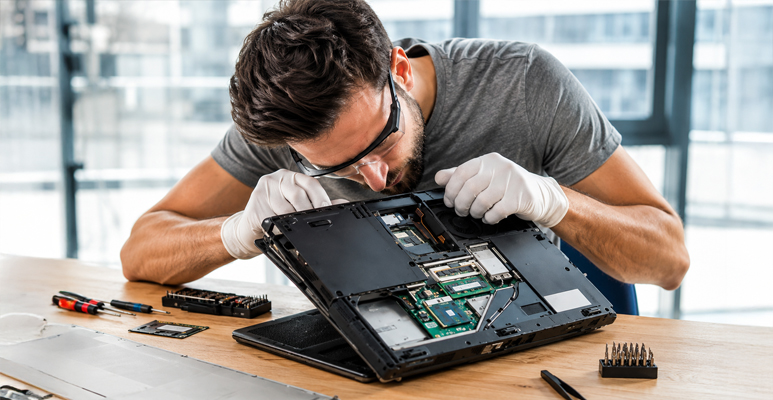
A repair technician doesn’t just guess. Professional laptop repair follows a clear process to find the real cause of the fault, not just the obvious symptom.
- Diagnostic check – the technician tests the charger, power port, and battery first, since these are the most common causes of laptop won’t turn on issues.
- Power supply testing – the charger and internal power circuit are checked with proper equipment, not guesswork.
- Battery testing – the battery is tested for charge capacity and physical condition, and replaced if it’s the cause.
- Motherboard inspection – if the simple causes are ruled out, laptop motherboard repair may be needed, starting with a check for damaged components, loose connections, or signs of corrosion.
- Charging port repair – a worn or damaged charging port can be cleaned or replaced so the laptop holds a charge properly again.
- Reassembly and final testing – once the fix is made, the laptop is rebuilt and tested again to confirm it powers on and stays on reliably.
Laptop stuck on a black screen?
Battery issue or motherboard issue? How to tell the difference
Two of the most common causes of laptop startup problems are the battery and the motherboard. They can look similar from the outside, but the fix is very different.
| Factor | Battery Issue | Motherboard Issue |
|---|---|---|
| Charging light | Flickers, drops out, or never comes on | Charging light may work fine, laptop still won't start |
| Behaviour on charger | Sometimes turns on only while plugged in | Won't turn on even while plugged in |
| Physical signs | Case may feel warm or slightly raised | Usually no visible physical change |
| Typical fix | Battery replacement | Component-level motherboard repair |
DIY fixes vs professional laptop repair
A hard reset or trying a different outlet is safe and worth doing first. Beyond that, laptop charging issues and internal faults are best left to a trained technician for proper laptop repair.
Using a cheap, unbranded charger to “test” the laptop can cause more harm than good. CFA Victoria warns that chargers with the wrong voltage or current can damage the battery and, in some cases, lead to overheating. Sticking with the original charger, or a genuine replacement, is always the safer option.
Opening up a laptop yourself can also void any chance of a clean repair later, since it’s easy to disturb a connector or a component without realising it.
What to expect during professional laptop repair
- Free diagnostic check to see exactly what’s causing the fault.
- Straightforward explanation of what can and can’t be saved.
- Genuine parts and proper component-level testing, not guesswork.
- Warranty cover on parts and labour once the repair is complete.
Conclusion
A laptop that won’t turn on feels like a disaster, but it usually isn’t one. Most of the time, laptop repair is a straightforward fix: a charger, a battery, or a small internal fault, not a dead machine.
The main thing is not to wait too long or try DIY fixes that could make things worse. Jazzy Mobiles offers a free, no-obligation diagnostic check for laptops with power and startup issues at both Cheltenham and Deer Park, so you’ll know exactly what’s wrong before committing to anything.
Frequently Asked Questions
Why won't my laptop turn on at all?
How do I know if it's the battery or the charger?
Can a laptop with a black screen still be fixed?
Will I lose my files if my laptop won't start?
Should I try to fix laptop power issues myself?
READY WHEN YOU ARE