QUICK ANSWER
Turn the device off straight away, don’t charge it, and don’t use rice. Professional liquid damage repair works by opening the device, cleaning corrosion off the internal parts, and drying them properly, something a bag of rice can’t do. Acting within the first few hours gives your phone or laptop, and the data on it, the best chance of survival.
In this article
- What to do in the first few minutes
- Signs your device has liquid damage
- Why waiting makes liquid damage worse
- What professional liquid damage repair involves
- Phone vs laptop liquid damage
- DIY drying vs professional repair
- Frequently asked questions
A splash on the keyboard. A phone that slips out of a pocket into the sink. It happens to almost everyone at some point, and it’s easy to panic. What you do in the next few minutes matters more than you’d think, and it’s usually the difference between a quick fix and a dead device.
Liquid damage repair is one of the most common jobs, and also one of the most misunderstood. Most people reach for a bag of rice. Most people are wrong too. This guide walks through what actually helps, what makes things worse, and how professional liquid damage repair, sometimes called water damage repair, gives your phone or laptop the best chance of coming back to life.
What to do in the first few minutes
Signs your device has liquid damage
Sometimes liquid damage is obvious. Other times it shows up days later, once corrosion has had time to build. Watch out for:
- The screen flickers or shows odd lines or colours – a sign moisture has reached the display connector.
- The device won’t turn on at all – often the first thing people notice.
- Muffled sound – the speaker or microphone sounds distorted or quiet, even after drying.
- Charging is slow, patchy, or doesn’t work – liquid residue in the charging port can block a proper connection.
- A burning or metallic smell – this can mean corrosion is already affecting internal parts.
- On the iPhone, there’s a liquid contact indicator inside the SIM tray, this small sticker is normally white or silver and turns fully red once it has contacted water.
If you notice any of these, avoid trying to open the device yourself. A trained technician can properly assess water damage to a phone or laptop without causing further harm to delicate internal parts.
Why waiting makes liquid damage worse
Water on its own isn’t the biggest problem; it’s what’s dissolved in it. Tap water, coffee, soft drinks and sweat all carry minerals and salts. Once those minerals touch a circuit board, they start forming corrosion, which slowly eats away at tiny metal contacts.
This isn’t just a repair issue, it’s a recognised safety one. CFA Victoria lists prolonged exposure to fresh or salt water as one of the direct causes of corrosion inside a battery, which can lead to the battery overheating or failing. That’s a big part of why a “dried out” device should still be checked properly rather than just switched back on.
Corrosion also doesn’t stop once the device feels dry. It keeps spreading underneath the surface, sometimes for days, quietly creating new faults that weren’t there when the spill happened. A phone that seemed fine the next morning can stop working a week later, which is why early liquid damage recovery gives a far better result than waiting to see what happens.
Safety note: if the battery looks swollen, puffed up, or the back cover has lifted after a spill, stop using the device immediately and don’t try to charge it. Never touch a swollen or leaking battery with bare hands, as heat or chemicals released can cause burns; see the CFA’s guidance on battery safety. The ACCC’s lithium-ion battery safety guide also recommends stopping use as soon as swelling, leaking or an unusual smell is noticed.
What professional liquid damage repair involves
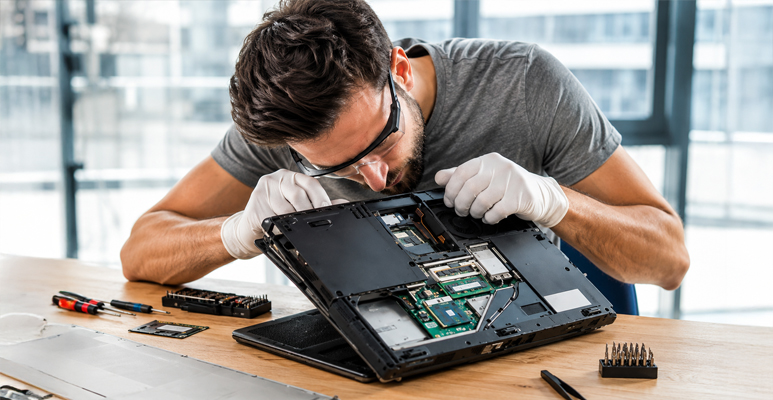
This is where professional device repair earns its keep. Rice and a warm windowsill can remove some surface moisture, but they can’t touch the corrosion that forms underneath components. Here’s what actually happens on the bench:
- Diagnostic check – the device is opened and inspected to see exactly where liquid has reached and what’s affected.
- Full disassembly – the battery is disconnected first, for safety, before any other parts are removed.
- Ultrasonic cleaning – components are cleaned using specialised solutions that dissolve corrosion without damaging delicate parts, something a cloth or rice cannot do.
- Thorough drying – proper drying equipment removes moisture from tiny gaps that a bag of rice would never reach.
- Component testing – each part is tested individually before reassembly to confirm it’s actually working, not just powered on.
- Reassembly and final check – the device is rebuilt and tested again to confirm everything, from charging to the camera and speakers, works properly.
Dropped your device in water?
Phone vs laptop liquid damage
| Factor | Phone | Laptop |
|---|---|---|
| Common cause | Dropped in sink, toilet, pool, or rain | Spilled drink or water on the keyboard |
| Where liquid pools | Around ports, speaker and battery | Under the keys, above the motherboard |
| Some protection | Newer models may have a degree of water resistance, though this can weaken over time | Very few laptops offer meaningful spill protection |
| Typical repair time | Often same day, once diagnosed | Can take longer, as more components sit close together |
DIY drying vs professional repair
The rice method is popular because it’s cheap and easy, not because it works well. Rice can absorb a little surface moisture through the charging port, but it cannot reach corrosion forming on a circuit board, and it does nothing for a laptop keyboard where liquid has already pooled underneath.
Silica gel packets perform slightly better than rice, but neither option cleans corrosion or tests individual components afterwards. A device can seem to “come back to life” after a few days of DIY drying, only to develop new faults weeks later as hidden corrosion continues to spread.
What to expect during professional liquid damage repair
- Free diagnostic check to see what’s actually affected.
- Straightforward explanation of what can and can’t be saved.
- Ultrasonic cleaning and proper drying, not rice or a hairdryer.
- Warranty cover on parts and labour once the repair is complete.
Conclusion
A spill or a dunk in water doesn’t have to mean the end of your phone or laptop. What matters most is speed: switch it off, keep it off, and skip the rice. Getting the device to professional liquid damage repair within the first few hours gives it the best possible chance of a full recovery, data included.
Jazzy Mobiles offers free, no-obligation diagnostic checks for liquid damaged phones and laptops at both Cheltenham and Deer Park, so you’ll know exactly what’s involved before committing to anything.
Frequently Asked Questions
Can a phone or laptop still work after water damage?
What should I do first if I spill water on my laptop?
Does putting my phone in rice actually work?
Will I lose my photos and files if my device gets wet?
Not always, but it’s a real risk. The ACCC notes that repairing electronic products like phones and computers can result in lost stored data, which is why a repairer should back up or check what’s recoverable early rather than after multiple repair attempts. Acting quickly gives the best chance of keeping your files intact.
Does water damage void my warranty?
It depends on the circumstances, so it’s worth checking rather than assuming either way. Consumer guarantee rights generally don’t cover damage caused by the consumer misusing the product, and whether an accidental spill counts as misuse can depend on the specific situation. It’s still worth checking your rights on the ACCC’s repair, replace, refund page if you’re unsure whether your situation qualifies.
READY WHEN YOU ARE