September rolls around. Apple holds an event. Your feed fills up with new iPhones.
And somewhere in the middle of all that, you start wondering whether the phone in your pocket is past it.
Here’s the part nobody leads with. There is no plain iPhone 18.
If you walked into one of our stores and asked for one, we’d have to explain that at the counter. So let’s explain it properly here instead, in plain English, before you spend anything.
There’s no standard iPhone 18, and that’s the first thing to sort out
Apple announced three phones: the iPhone 18 Pro, the iPhone 18 Pro Max and the iPhone Duo.
That’s it. At launch, Apple did not announce a standard iPhone 18 or iPhone 18 Plus model.
So when someone says “the iPhone 18”, they usually mean one of the two Pro models. If you’re searching for a non-Pro version to compare against, you won’t find one. Apple did not announce a standard iPhone 18 model at launch.
What Apple did instead was leave the older phones on sale. More on that below.
What Apple actually announced, and when you can get it
The two Pro phones went to pre-order on Saturday 12 September 2026. They’re available from Friday 18 September 2026 in more than 65 countries, Australia included.
The iPhone Duo runs on a different timetable. Pre-orders open on 16 October 2026, with the phone available from 23 October 2026.
So if you’re reading this in the third week of September, one of these phones is on shelves and the other one isn’t.
iPhone 18 Pro and 18 Pro Max features, explained simply
These two are the same phone in two sizes. The 18 Pro is 6.3 inches. The 18 Pro Max is 6.9 inches.
Here’s what Apple has changed, and what each change actually means for you.
- A 48MP Fusion Main camera with variable aperture. Variable aperture means the lens can let in more or less light depending on the shot. In practice that’s aimed at low light and depth of field, which is the bit people notice in photos of their kids at night.
- The A20 Pro chip. The processor. Newer chips generally handle demanding apps and games more comfortably, though how much you notice depends on what you actually run.
- A next-generation vapour chamber. This is a cooling system inside the phone. Phones that stay cooler under load tend to hold performance for longer during things like recording video or gaming.
- A redesigned Dynamic Island. It now shows up to three Live Activities at once. That’s the pill at the top of the screen that tracks your Uber, your timer and your footy score.
Colours are black, silver, glacier and burgundy. Storage runs 256GB, 512GB, 1TB and 2TB.
Apple publishes Australian pricing on its own site. You’ll find it on Apple’s Australian iPhone page.
The folding one is called the iPhone Duo
This is the phone everyone’s been waiting on, and its name matters. It’s the iPhone Duo. “Foldable iPhone” describes it, but it isn’t what it’s called.
It has a 7.6-inch inner Super Retina XDR display that folds, plus a 5.4-inch outer display you use when it’s closed. Same A20 Pro chip as the Pro models.
The cameras are a 48MP Dual Fusion rear system and a 12MP Center Stage front camera, plus an under-display FaceTime camera.
Apple quotes up to 31 hours of video playback on the inner display and 44 hours on the outer one. Colours are Night Sky and Star White.
Apple publishes Duo pricing on its Australian site. Check it there before you commit to a pre-order.
What else Apple is still selling
This is the bit that gets missed. Apple’s current Australian iPhone lineup includes:
- iPhone Duo
- iPhone 18 Pro
- iPhone Air
- iPhone 17
- iPhone 17e
- iPhone 16
So there are still plenty of options that aren’t a Pro model. They’re just last year’s phones rather than a new base model.
iOS 27 arrived on 15 September
Software often does more for how a phone feels than new hardware does.
iOS 27 became available in Australia on 15 September 2026. Apple lists support for iPhone 11 and later, plus iPhone SE (2nd generation and later). Check Apple’s page for the full compatibility list.
Read that list again. An iPhone from 2019 still gets the current version of iOS. If your phone is on that list, you’re not being left behind by Apple.
Before you update anything, it’s worth knowing how to back up your phone safely before a repair or an update. Same process, same reason.
Before you decide anything, let us look at the phone you’ve got
What to do with the phone in your pocket right now
You don’t have to decide today. Run through this first.
- Update it, then give it a few days. A phone can feel slower straight after a major iOS update while it re-indexes files in the background. Judge it after that settles, not on day one.
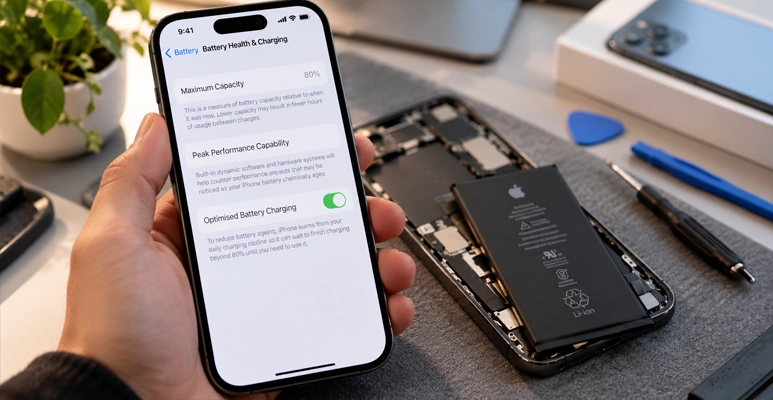
- Check your battery health. On iPhone 15 and later, go to Settings > Battery > Battery Health. On iPhone 11 to 14, it’s Settings > Battery > Battery Health & Charging. A low maximum capacity figure suggests the battery is worn. It doesn’t prove that’s your only problem, but it’s the most common one we see.
- Check your storage. A phone that’s nearly full behaves badly. Photos and old app data are usually the culprits.
- Look at the glass properly. A hairline crack you’ve been living with can spread, and it can let moisture in. Our guide on cracked screen repair vs replacement walks through what’s involved in each.
- Don’t assume every symptom is the battery. Slow charging can point to a worn battery, a dodgy cable or a lint-packed charging port. They’re different jobs. We’d check the port before touching anything else.
If none of that helps, our rundown of common iPhone problems and how to deal with them covers the rest.
Running out of storage is not a reason to buy a new phone
Storage is the quiet reason people upgrade, and it is usually the easiest one to solve. Before you spend, open Settings and look at what is actually filling the phone. Photos and videos are almost always the bulk of it, and moving them to iCloud or a computer frees the space without changing handsets.
If the phone is slow as well as full, that is worth separating out. A phone short on free space can feel sluggish at everything, and clearing it often settles the problem. If it stays slow afterwards, bring it in and we will look at the battery and the storage together before you decide anything.
If you are upgrading, do these three things first
- Back it up. Twice if you can, once to iCloud and once to a computer. People lose photos in the handover, not in the repair.
- Check what actually transfers. Messages, health data and two-factor authentication apps don’t always move as smoothly as your photos do.
- Wipe the old phone properly. Sign out of your Apple Account and erase it before it leaves your hands. It’s the step people skip most often, and it’s worth reading up on protecting your phone from threats while you’re at it.
Where to find us
In Cheltenham we’re at Shop 3048C, Level 3, Westfield Southland, 1239 Nepean Hwy, Cheltenham VIC 3192, on (03) 8351 5319. Our Deer Park store is at Shop T45A, Brimbank Shopping Centre, 72 Neale Road, Deer Park VIC 3023, on (03) 9969 2490. Both open seven days.
The short version
There’s no plain iPhone 18. The real choice is between two Pro models, a folding phone landing in late October, and last year’s lineup that Apple is still selling. None of it is urgent. Update to iOS 27, check your battery health and your storage, then see how your current iPhone feels after a few days. If it still isn’t right, that’s a repair question rather than a shopping one. We can answer it in a few minutes at the counter at Jazzy Mobiles.
Frequently asked questions
Is there a standard iPhone 18?
No. Apple released the iPhone 18 Pro, the iPhone 18 Pro Max and the iPhone Duo. There’s no non-Pro iPhone 18.
What’s the foldable iPhone actually called?
The iPhone Duo. Pre-orders open on 16 October 2026 and it’s available from 23 October 2026.
Will iOS 27 run on my older iPhone?
It supports iPhone 11 and later, plus iPhone SE (2nd generation and later). Apple’s Australian iOS page has the full list.
My iPhone got worse after the update. Is it broken?
Not necessarily. Give it a few days to settle, then check battery health and storage. If it’s still poor after that, bring it in and we’ll take a look.
Can you fix my current iPhone while I make up my mind?
Yes. Screens, batteries, charging ports, cameras, speakers and microphones are all everyday work for us, at both stores.