
Your iPhone battery health has slipped under 80%. Does that mean a new battery today? Not on its own. For most people, Apple doesn’t publish 80% as a replace-now line.
The number does two jobs on Apple’s Australian pages. It’s a design figure for how batteries age. And for AppleCare customers, it’s a cover rule.
What actually tells you it’s time is the phone itself. Does Battery Health recommend a replacement? Does the phone still get you through the day? Here’s how to read the screen, what to check, and how a battery swap works at our Southland and Brimbank stores.
What the 80% figure actually measures
Apple’s iPhone battery and performance page calls maximum capacity “the measure of battery capacity relative to when it was new”. That’s all the percentage is. It isn’t a fault code, and it isn’t a pass or fail.
Apple’s battery guide for iPhone 11 and later then sets a design figure. Batteries of iPhone 14 models and earlier “are designed to retain 80 per cent of their original capacity at 500 complete charge cycles under ideal conditions”. For iPhone 15 models and later, Apple gives 1,000 complete charge cycles.
Those last three words matter. Apple adds that “the exact capacity percentage depends on how the devices are regularly used and charged”. Two phones bought the same week can read quite differently a year later.
| Your iPhone | Apple’s design figure | Where to find the reading |
|---|---|---|
| iPhone 15 and later | 80 per cent at 1,000 complete charge cycles | Settings > Battery > Battery Health |
| iPhone 11 to iPhone 14 | 80 per cent at 500 complete charge cycles | Settings > Battery > Battery Health & Charging |
So the same 79% sits against a different design figure on an iPhone 13 than on an iPhone 16. Compare your reading with your own model’s line, not someone else’s.
Read the whole Battery Health screen
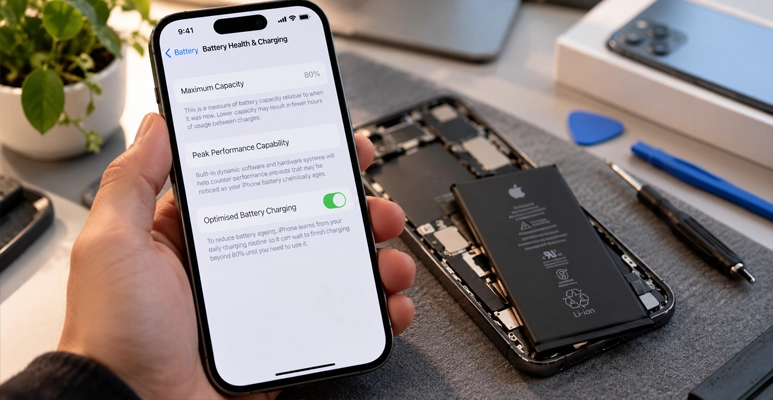
The percentage isn’t the most useful part of the screen. On iPhone 15 models and later with iOS 17.4 or later, Apple says you can also see “if a battery replacement is recommended”. That’s a direct signal, and it comes from the phone itself.
Here’s a quick check that takes two minutes:
- Open Settings, then tap Battery.
- Tap Battery Health on iPhone 15 and later, or Battery Health & Charging on iPhone 11 to 14.
- Look for a replacement recommendation before you look at the percentage.
- On iPhone 15 and later, note the cycle count and the date of first use.
- Take a screenshot. It’s handy if you talk to us or to Apple later.
Apple’s iPhone battery and performance page also describes a message that reads: “Your battery’s health is significantly degraded.” Apple says “This message doesn’t indicate a safety issue.” Treat it as a prompt to plan, not an alarm.
Check again in a month or two. A slow, steady slide is ordinary ageing. Apple says rechargeable batteries “are consumables and have a limited lifespan”, so this was always coming.
One thing to skip: running the phone flat to “reset” the number. Apple’s page doesn’t recommend it. Our guide on how to extend your iPhone battery life explains why running it all the way down works against you.
Slowdowns that can point to an ageing battery
Apple lists what an aged battery may do on iPhone 11 and later. It calls these “noticeable, possibly temporary, effects”:
- longer app launch times
- lower frame rates
- increased processing times
- reduced wireless-data throughput
- backlight dimming or lower speaker volume
- in extreme cases, the camera flash or other camera features temporarily disabled
Symptoms point. They don’t prove. A misbehaving app, a full storage bar or a fresh update can make a phone feel slow too.
If your main complaint is the phone running flat early, rule out the simple causes first. Work through seven common reasons a phone battery drains too fast before you book anything.
Under 80% and not sure what to do?
Bring your iPhone to Westfield Southland or Brimbank and we’ll go through the Battery Health screen with you.
When iPhone battery health says it's time
Work through these three questions in order. They come from what Apple publishes, not from a magic number.
- Are you on AppleCare+ or AppleCare One, and under 80%? Talk to Apple first. This is the one place 80% acts as a real line.
- Does Battery Health recommend a replacement? Plan it in.
- Are you seeing the slowdowns above, or is the phone no longer lasting your day? If you plan to keep the phone, get the battery looked at.
If the answer to all three is no, there’s no rush, even at 78%. There’s no prize for replacing early.
On question one, Apple’s iPhone battery service page is clear: “We’ll replace the battery at no extra charge if the capacity drops below 80%.” If that’s you, use it.
Without a plan, the picture changes. The same page says Apple’s warranty “doesn’t cover accidental damage or batteries that wear down from normal use”. Apple also notes its warranty sits alongside your rights under consumer law.
Bought the phone second-hand?
The percentage alone tells you little about a used phone’s past. On iPhone 15 and later, the cycle count and date of first use fill in the history. A phone with a modest reading but a high cycle count has worked hard. On iPhone 11 to 14 you won’t see those details, so watch how the phone behaves over the first few weeks instead. Either way, check the iPhone battery health screen on the day you buy, and keep the screenshot.
How a battery swap works at Jazzy Mobiles
Our Battery Replacement service covers iPhone, iPad and laptops. We use top-quality replacement batteries, and most repairs are done while you wait.
A little preparation makes the visit smoother:
- Back up first. Any repair carries some risk to data. Here’s how to back up your phone safely before a repair.
- Bring your screenshot. The reading, cycle count and first-use date help us talk you through it.
- Tell us what you’ve noticed. Slow apps, a dim screen or sudden shutdowns are all worth mentioning.
- Mention any other damage. If the phone has been dropped, say so at drop-off so it can be looked at on the same visit.
- Time it with your shop. Both stores open until 9 pm on Thursday and Friday, which suits an after-work visit.
Can’t get to a centre? Ask either store about our Mail-In Repair option.
Find us at Southland or Brimbank
Cheltenham: Shop 3048C, Level 3, Westfield Southland, 1239 Nepean Hwy, Cheltenham VIC 3192. Phone (03) 8351 5319. If you’re in Melbourne’s south-east, Jazzy Mobiles at Westfield Southland is your closest store.
Deer Park: Shop T45A, near Target, Brimbank Shopping Centre, 72 Neale Road, Deer Park VIC 3023. Phone (03) 9969 2490. Out west, head to our Brimbank Shopping Centre store in Deer Park.
Both stores keep the same hours. Monday to Wednesday: 9 am to 5:30 pm. Thursday and Friday: 9 am to 9 pm. Saturday: 9 am to 5 pm. Sunday: 10 am to 5 pm.
Under 80% is a prompt to check, not a deadline
Below 80% tells you how much capacity your battery has lost since new. Whether to act depends on three things. Does Battery Health recommend a replacement? Are you covered by AppleCare? How is the phone actually behaving?
Read the whole screen, check your cover, then decide.
If the drop that wore the battery also cracked the glass, Jazzy Mobiles handles phone screen repair too, along with Charging Port Repair.
Common iPhone battery health questions
1. Is 80% battery health good?
Apple doesn’t grade readings as good or bad. At 80%, your battery holds about four-fifths of its capacity when new. Whether that’s enough depends on your day and on what the Battery Health screen recommends.
2. Can my iPhone battery health go back up?
Don’t expect it to. Apple describes capacity falling as a battery chemically ages, and it doesn’t suggest any charging routine that reverses it. A new battery is what brings capacity back.
3. Will a battery replacement wipe my iPhone?
Replacing a battery isn’t a factory reset. Still, back up before any repair, because no repair is completely risk-free for your data.
4. Will a new battery make my iPhone faster?
Only if the battery was the cause. Apple links some slowdowns to an aged battery, so a new one can help there. If an app or full storage is the problem, a battery won’t fix it.
5. Can I send my iPhone in instead of visiting?
Yes, Jazzy Mobiles offers Mail-In Repair. Call the Cheltenham or Deer Park store and ask how it works for your model.
Talk to us about your iPhone battery
Call Cheltenham or Deer Park with your iPhone model and Battery Health reading, and we’ll explain your options.